

1. PeopleNexus
  2. RigOps
  3. RigOps platform

RigOps · by People Nexus Technologies

One platform. Every system on the rig.

The drilling day, the equipment, the people and the procedures, on one rig context. Built for drilling contractors and operators: rig teams, approvers, inspectors, coordinators and the people who run the fleet.

ProductRigOps · rig operations platform
Runs onBrowser · phone · Android
ContextCompany · rig · well
AIRead-only · optional

The first screen

Opens on what needs you today.

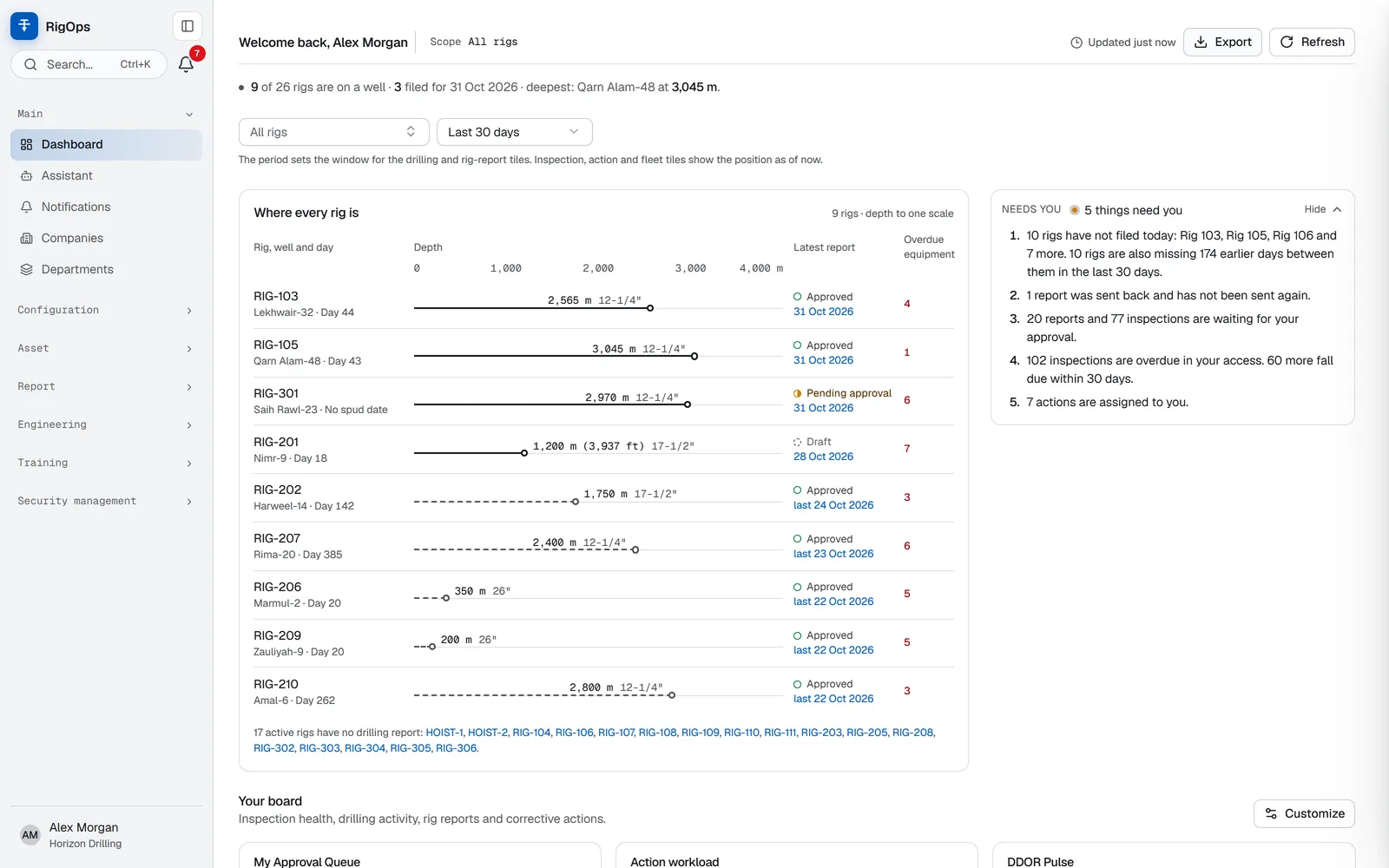
Every rig on one depth scale, the latest report and its state, overdue equipment, and a short list of what is waiting for you.

The RigOps dashboard: nine rigs drawn on one depth scale with each rig's latest report state and overdue equipment count, and a panel listing five things that need the user's attention.
RigOps dashboard, November 2026 build. Demonstration data. Click the image to open it full size.

Product film · 2 min 54 s

From the day's record to the decision.

Daily drilling reports, approvals, inspections, P&ID, training, workflows and corrective actions, end to end. Captions are built in.

The film loads only when you press play (11 MB). Illustrative scenes and sample data.

For every role

Less chasing, for everyone who touches the rig.

WhoTheir jobWhat changes
Rig teamFile the shiftThe report starts from the right prior day, with values calculated.
ApproversUnblock a decisionOne queue, eligible approvers only, a reason on every return.
InspectorsShow what is dueDue dates calculated, and a review queue.
Training coordinatorsClose a training gapA matrix per person and rig, with 90-day warnings.
HSE and qualityClose an actionOwner, SLA date, root cause, and verification before closure.
Operations leadersUnderstand the fleetSummaries and analytics that state their coverage, and an assistant to ask.
Top drive · drill floor 1 2 3
  1. Bit, mud, BHA and deductions carry over from the right prior day.
  2. Progress, NPT and downtime are calculated, never typed twice.
  3. The time log is capped at 24 hours per day.
M01 · DRILLING REPORTS

File the drilling day once, properly.

Each daily drilling report starts from the right prior day, shows who holds it and for how long, and flags gaps before it is approved.

Scope
One rig, one well, one calendar day
Entry
Six guided steps; a draft needs only its identity
Approval
Eligible approvers, never the submitter; a reason on every return
Locking
Read-only once approved; reopen only when authorised
Outputs
PDF (A4), IADC-style Excel, period analytics
Trip tank · diesel and fluids 1 2
  1. Closing stock is derived from opening, received and consumed.
  2. Consumption above stock is refused; a ledger break asks to reconcile.
M02 · RIG REPORTS

Diesel to rig moves, in one place.

Diesel, people on board, BOP tests, drills, rentals and rig moves, with fleet analytics that state how much of the fleet each figure covers.

Event logs
Diesel · POB · BOP tests · drills · rentals · rig moves
Intervals
Function test 7 days · BOP pressure test 21 days · drills 7 days
Rentals
Cost accruing by the day, grouped per currency
Rig moves
Milestones from planned to spudded, against the contract target
Summaries
One rig × one month; one company × one day
Double ram BOP 1 2
M03 · INSPECTIONS

See what is overdue before anyone asks.

Every inspection belongs to a specific item. Due dates are calculated, and the most overdue items surface first.

  1. Serial number unique per rig; condition kept apart from review.
  2. Readings far outside the item's history are flagged to re-measure.
Schedules
Intermediate (3, 6 or 12 months) and major (1–5 years)
States
Overdue · due within 30 days · in date
Review
No self-approval, admins included; batch approval with one comment
Evidence
Readings, files and the full review trail on the record
Mud pump 1 2
  1. The type lives in a shared catalog: category, type, part, component.
  2. The physical item, its serial number and condition live on the rig.
M04 · EQUIPMENT REGISTER

Know exactly which item was inspected.

A catalog shared across rigs and companies, and a register per rig. Bring your existing register in from Excel when you start.

Catalog
Category → equipment type → part → component and spec
Drawings
51 drawings: 30 P&ID symbols and 21 rig equipment types
Conditions
In use, standby, in storage, under repair, defected and more
Import
Excel import of your existing register
Manifold · P&ID 1 2
  1. Each symbol links to its equipment record and latest inspection.
  2. Status by date: overdue, due within 60 days, in date.
M05 · P&ID BUILDER

See the risk on the drawing, before it stops the rig.

Draw the rig P&ID, link each symbol to its equipment record and inspection status, then issue and lock revisions. Includes an equipment sheet and a 3D view.

Symbols
30: 17 common, 13 drilling-specific
Revisions
Draft with version check; issued is read-only
Exports
PNG · print or PDF · project JSON · Excel register
Phone
Opens as a viewer
  1. 1Request raisedVendor onboarding · frozen copy of the designDONE
  2. 2Task: fill your partEach step sees only its own fieldsDONE
  3. 3ConditionAmount above 10,000 → finance reviewNOW
  4. 4Parallel approvalsLanes, then join on all or a quorumNEXT
  5. 5Closed, with trailCompleted, rejected or withdrawn—

Example route. Every route is configured by your own authors.

M06 · PROCESS STUDIO

Turn any procedure into tracked work.

Design the form and approval route for any procedure, from contractor onboarding to access requests, and track every live request to its deadline.

Steps
Start · task · approval · condition · parallel · subprocess · end
Publishing
Checks the design first, e.g. every required field is fillable
Safety
Rework loops are bounded; editing a design never changes a request in flight
My Work
Each person's queue, with owner and due date
  1. 1RaisedSource, type, rig, descriptionDRAFT
  2. 2Action ownerDoes the work by the SLA dateOWNER
  3. 3VerificationSingle, sequential or parallel verifiersVERIFY
  4. 4ClosedOnly after verifiers acceptCLOSED
M07 · ACTION TRACKER

Close findings only when verified.

Corrective actions with an owner, an SLA date and verification before they close. Overdue items are named, not buried.

Records
Owner, intended action, SLA date, evidence, comments
Non-conformance
Immediate correction, root cause, corrective and preventive action
Sweeps
Background checks for overdue and orphaned actions
Example training matrix for one rig
RoleC-AC-BC-CC-D
DrillerValidValidExpiringValid
Assistant drillerValidExpiredValidValid
DerrickmanExpiringValidValidValid
FloormanValidValidNot doneValid
ValidExpiring in 90 daysExpired or missingExample
M08 · TRAINING

Know who is not qualified, today.

A training matrix per rig: who is in date, expiring, expired or missing, from nomination and session through to certificate.

Matrix
Requirements resolved per person and rig
Warnings
Certificates expiring within 90 days
Path
Nomination → approval → waitlist → session → attendance → certificate
Certificates
From a template, each with a public verification page
  1. 1Rev 1 · effectiveNever edited in placeSUPERSEDED
  2. 2Change requestTriaged by the ownerDONE
  3. 3Rev 2 · reviewFile and fields frozenDONE
  4. 4Rev 2 · effectiveNow, or on a future dateCURRENT
M09 · DOCUMENTS

Always work from the current revision.

A controlled library with owners, designated approvers and numbers that are never reused. People acknowledge the policies that apply to them, and find their signed copies later.

Numbers
Company-department-type-sequence, server-generated
Reviews
Periodic review reminders 30 days ahead
Acknowledge
Read-and-acknowledge with an "N of M done" view
Downloads
Audited

At the rig and in the office

Works on the device in your hand.

BROWSER

Any modern browser

Nothing to install for office or rig users. Sign in and work.

PHONE

Built for gloves

Lists become cards, filters slide up from the bottom, and touch targets are 44 pixels.

ANDROID

Android app

Installed directly on rig devices. Offline forms are on the roadmap, not in the current build.

Deployment and integration

Runs where your data has to live.

Three ways to run RigOps, one application. Start on the evaluation environment, then move to the setup your IT and data-residency rules require.

D-01 · ON-PREMISE

In your country, on your servers

  • Installed in your data centre
  • Data never leaves your network
  • We install, update and support
D-02 · DEDICATED CLOUD

Your own environment, run by us

  • A cloud region you choose
  • We run hosting, monitoring and backups
  • Updates in agreed windows
D-03 · EVALUATION · START HERE

Try it before you decide

  • Hosted by us on Azure
  • Ready in days, nothing to install
  • Sample data, or data you approve
Your systems
ERP, HR and training systems connect through the REST API
Data in
Equipment register from Excel; activity codes and crew rosters at setup
Data out
PDF and Excel exports; IADC-style drilling report export
AI model
Gemini, OpenAI, Azure or a local model on your network — or switched off

Security and compliance

Built for procurement review, not just for demos.

The answers procurement asks for, up front. Implemented controls, described as such; not a certification.

RefControlWhat it means
SEC-01Scope-filtered, fail-closedAccess is checked on the server for every action and query, by company, rig, well and department. No scope means zero rows.
SEC-02Encrypted in transit and at restTLS everywhere and encrypted storage.
SEC-03Append-only audit trailActor, timestamp and field-level diffs. Nothing changes silently — not even by us.
SEC-04Sign-in protectionLockout for 15 minutes after five failed sign-ins; passwords of at least 12 characters; sessions end after 12 hours.
SEC-05Your data, exportablePDF and Excel on demand. Hosting and data residency are agreed with each customer.
SEC-06AI with guardrailsRead-only, scope-aware, provider-neutral, off unless enabled. Never used for training.
SEC-07Stated plainly: not built yetMulti-factor sign-in, single sign-on and offline forms are on the roadmap, not in the current build.

See it on your own workflows

30 minutes with the engineers. No slideware.

We walk through RigOps on the shape of your own reports and rigs. Then start with one rig and your own people: you choose what success looks like, and we measure it with you.